Appearance
Prototype PDF
Download a compact paper prototype in which selected panels share pages while their warp directions stay aligned with the page length.
Choose the prototype set
Choose File > Export > Prototype or Prototype in the panel-viewer toolbar. Both open the same Prototype PDF dialog.
Choose A3 or A4
The default is A3 (297 × 420 mm). A4 (210 × 297 mm) is the other current paper choice.
Choose Fit to page or a manual scale
Fit to page is the default. With generated panels, the dialog reports the automatic 1:N result. For a direct export, it calculates the fit after generating the panels and records the scale in the PDF. Manual choices are 1:1 through 1:10, then 1:15, 1:20, and 1:25. If a selected panel cannot fit at the manual scale, the export reports an error; choose a smaller printed scale or larger paper and retry.
Select the panels
When a matching generated set is available, every panel starts selected. Clear individual checkboxes or choose Deselect all, then retain at least one panel. The selected count appears in the Panels heading. A direct export without generated panels prints the full set and has no panel checklist.
Choose Print
The browser downloads a name such as
panels-prototype-A3-1to15.pdf, recording the resolved scale in the filename. A direct Fit to page export usespanels-prototype-A3-fit.pdf; read its resolved scale in the PDF footer.A matching generated set is reused. Otherwise generation and PDF creation happen together, without a separate Generate Panels step.
After Print, the viewer toolbar shows Prototype… and pauses the other export buttons. The File-menu path has no in-progress label; both paths produce the same selection, paper, and scale.
Fit uses the complete generated set
The automatic denominator is calculated from all loaded panels, even after some are deselected. Deselecting the longest panel therefore does not make Fit to page choose a larger printed scale. Choose a manual scale if the remaining selection fits at that ratio.
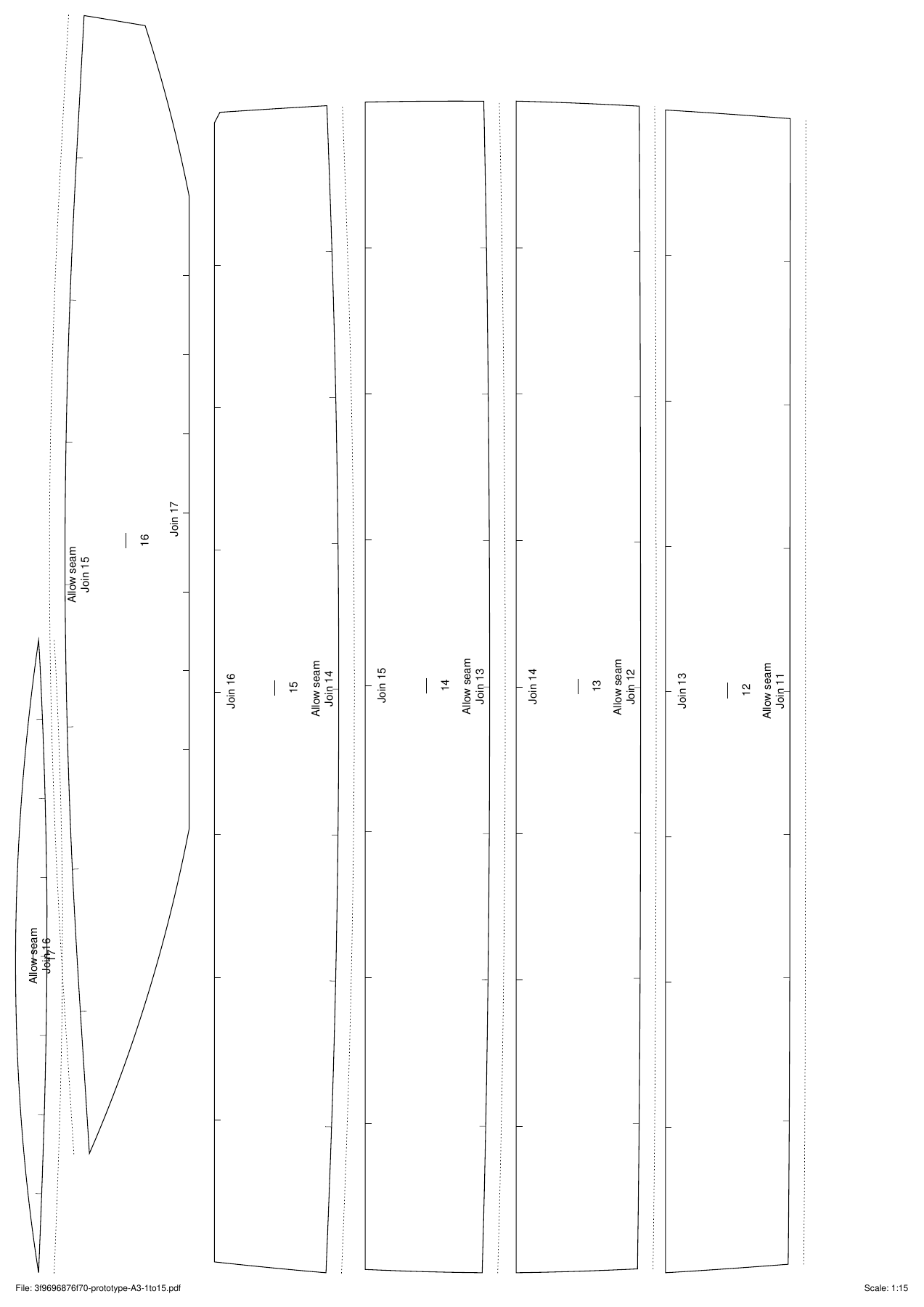
A3 Fit to page resolved to 1:15 for the 17-panel Albin Vega 27 gennaker example and packed the selection across three pages.
- Several selected panels share a page
- Warp directions follow page length
- File label
- Resolved scale
Read the packed output
Selected panels are packed with a 5 mm gap. They remain grain-aligned and may turn 180 degrees, but they do not rotate across the grain and never split between pages.
Each panel can include the solid boundary, dotted owned allowance band, match marks, warp mark, short panel number, and seam labels. The footer gives a file label and the scale. Prototype pages do not contain tile labels, registration crosses, or a calibration square.
The dotted allowance is made at least 5 mm wide on the printed page so it stays visible at small scales. It is therefore a visual seam indicator, not a proportionally scaled cutting allowance.
Print and check the model
Print at 100%
Use Actual size or 100%. A second fit-to-page operation changes the scale recorded in the filename and footer.
Check the resolved ratio
Measure a known design length divided by the stated denominator. This file has no independent calibration square.
Keep the page groups intact
Identify every selected short panel number and preserve its match and warp marks when cutting out or assembling the paper model.
Treat the dotted allowance as a marker
Do not use its printed width to infer the design's full-size allowance; read the seam label and construction setting instead.