Appearance
Edge shape and twist
Change the sail outline and its three-dimensional opening from the right-hand Shape card, then use Sail Shape when you need exact values for every edge at once.
Find the two editing surfaces
| Surface | Open it from | Best for |
|---|---|---|
| Preview card | Select Preview in the right-hand Shape card | Watching an edge, sheet-angle, or twist change on the sail |
| Sail Shape dialog | Design > Sail Shape | Entering exact cord, head, edge, twist, profile, and mould values in one dialog |
The two surfaces edit the same settings. One deliberate exception is foot opening: Preview does not show a Foot opening slider. Select Profile Edit > foot and use Depth, or enter Foot > Opening (%) in the Sail Shape dialog.
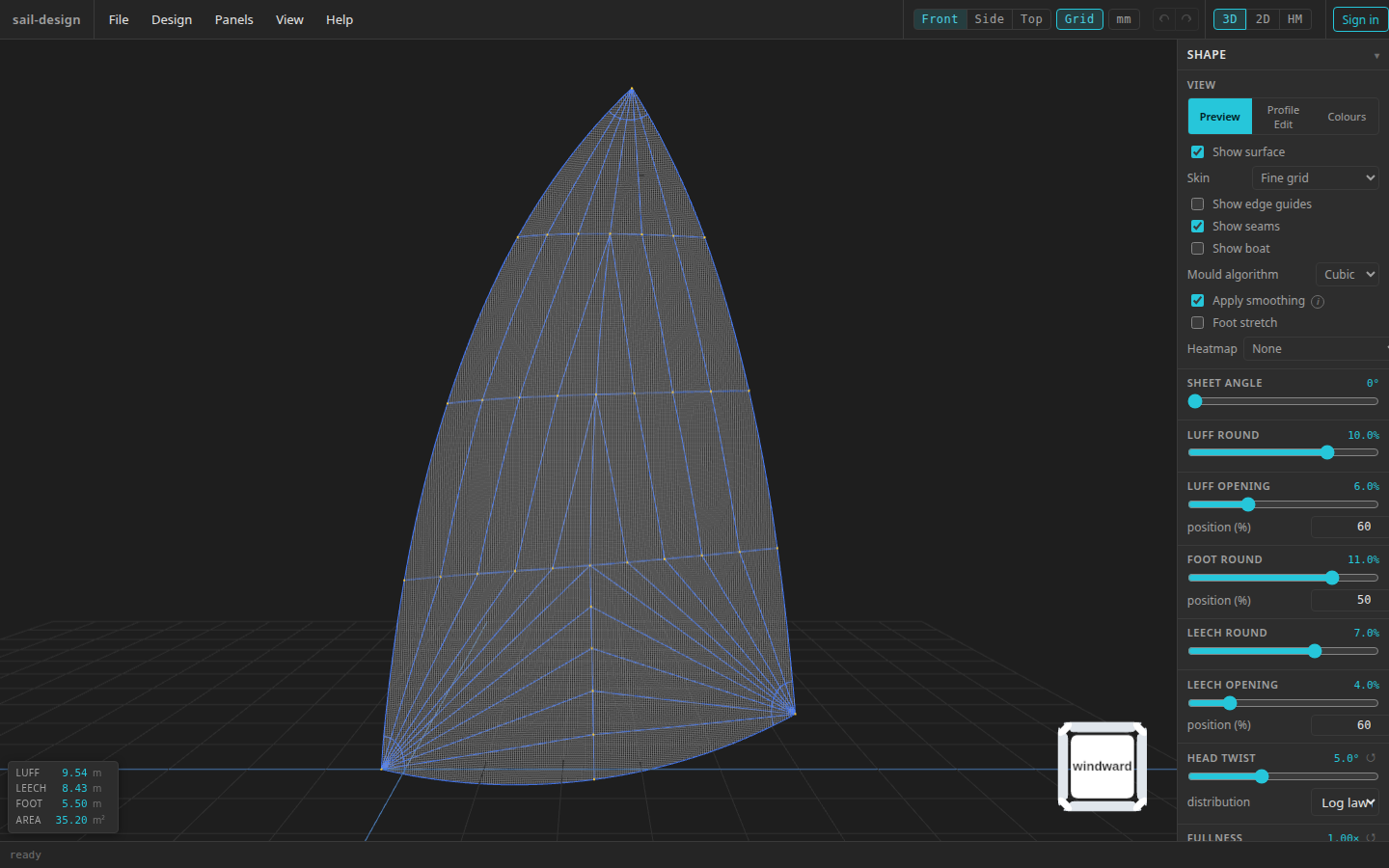
Preview controls on the preloaded Albin Vega 27 gennaker example. File > New supplies different starting values for other boats and sail types.
- Live edge and surface result
- Mould and view controls
- Round, opening, and position
- Head twist and distribution
Understand Round, Opening, and Position
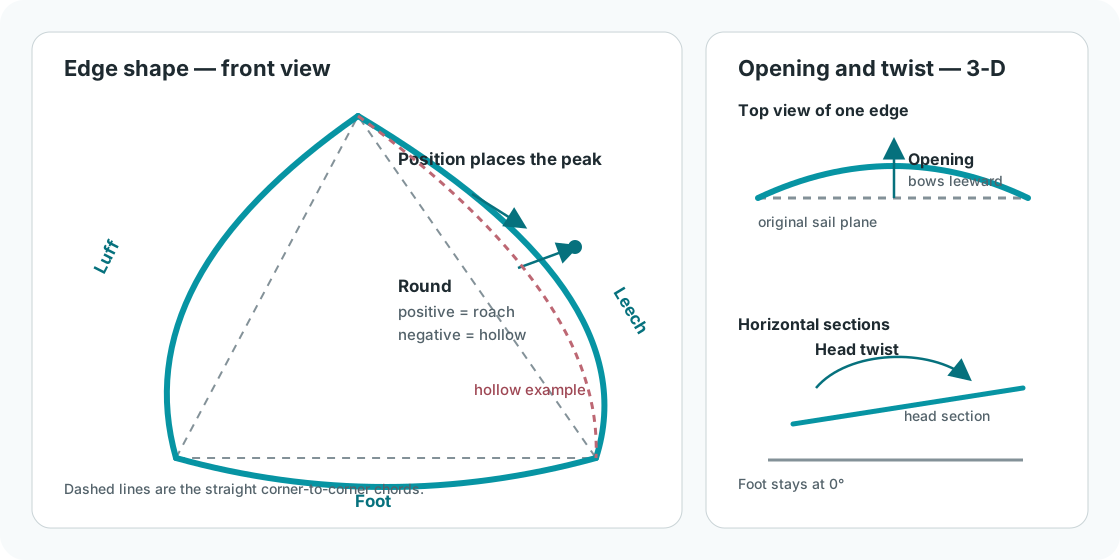
Edge controls shape the boundary; twist rotates horizontal sections progressively toward the head.
| Control | Meaning in the current UI |
|---|---|
| Round (%, signed) | Cloth offset from the straight chord. Positive produces an outward roach; negative produces a hollow edge. |
| Opening (%) | Non-negative leeward bow out of the original sail plane. |
| Position (%) | Location along the chord where the combined round and opening reach their peak. |
Round and Opening share one Position. Moving either shape component therefore does not introduce a second, independent twist along the edge.
Current edge ranges
| Edge | Round | Opening | Position |
|---|---|---|---|
| Luff | −20% to 20%, step 0.5 | 0–20%, step 0.5 | 10–90%, step 1 |
| Foot | −20% to 20%, step 0.5 | 0–20%, step 0.5 | 30–50%, step 1 |
| Leech | −20% to 20%, step 0.5 | 0–20%, step 0.5 | 10–90%, step 1 |
In Preview, the luff and leech have Round and Opening sliders plus a Position number input. The foot has Round and Position only; use the foot-profile path described above for its Opening value.
Show the surface
In the Shape card’s View section, choose Skin > Fine grid or Skin > White. The sail outline remains visible around the surface.
Move Round
Move right for more positive roach or left for a hollow edge. Use the percentage readout to reproduce a value in the Sail Shape dialog.
Move Opening and Position
Increase Opening to bow the edge leeward. Move Position to place the peak at a different point along the chord. Watch the outline and surface update together.
Checkpoint
The 3-D view changes immediately. If Show layout is enabled, a shape edit hides the stale overlay and refreshes it when you release the pointer.
Set the sheet angle
Sheet angle in Preview runs from 0° to 80° in whole degrees. It rotates the displayed sail about the luff chord so you can inspect how it sits to leeward.
Sheet angle is a view-only placement control. It does not change the mould, panel geometry, seams, exports, or 2-D design. If you enable Show boat while the angle is 0°, the app raises it to 15° so the sail separates visually from the centre plane.
A new Code 0 starts at 15°. Every other current sail type starts at 0°.
Set head twist and distribution
Head twist runs from −10° to 30° in 0.5° steps. The foot stays at 0° and the chosen distribution supplies the values in between.
| Distribution label | Observable progression |
|---|---|
| Log law (bottom-loaded) | Applies more of the change in the lower part of the luff, then eases toward the head |
| Linear (even) | Adds twist at an even rate from foot to head |
New designs start with Log law (bottom-loaded). Their head-twist starting value depends on sail type and, for several types, luff length. A Symmetric spinnaker is locked at 0°.
The ↺ control beside Head twist resets the angle to 5°. This is a shared quick reset, not a return to the selected sail type’s File > New value. It does not change the distribution.
Start from a fresh shape
There is no pane-wide shape reset. Use Undo to reverse recent edits, or File > New to start a fresh factory design for your boat and sail type. The separate Head twist ↺ control still resets only the twist angle.
Symmetric spinnaker locks
For a Symmetric spinnaker:
- Preview and Sail Shape combine the edge-shape row as Luff & leech and mirror its Round, Opening, and Position;
- leech-only shape sliders are hidden;
- foot Position is locked at 50%; and
- Head twist is locked at 0°.
Both Luff chord (mm) and Leech chord (mm) remain editable in Sail Shape, but changing either updates both. The 2-D edge editor also mirrors luff/leech shape changes. See Profiles and fullness for section locks, detached corners, and older-file conversion.
Continue with section shape
Edge controls do not set the camber of the horizontal sections between them. Use Profiles and fullness for coordinated Automatic shaping and small Individual profile adjustments.