Appearance
Rig and dimensions
Enter the dimensions that place the sail and its sheet points on the boat, set its corner-to-corner size, and confirm that its luff fits the available rig line.
Start with a boat and sail type
File > New asks for a known or custom boat first, then a sail type. That choice supplies the initial rig, tack location, chord lengths, head size, and shape settings. The starting values depend on both choices; they are not one universal set of defaults.
See Boats and sail types for the choices in the New Design dialog. Use the steps below when you want to inspect or change the resulting dimensions.
Enter the boat and rig dimensions
Open Design > Rig
The Rig dialog opens over the live sail preview. There is no separate Apply button: valid number changes update the design immediately, and Done closes the dialog.
Enter the Boat values
Control Accepted by the current input What it locates LOA — length overall (mm) 1,000 mm or more Boat length used by the boat and rig view Forestay offset — bow to forestay (mm) 0 mm or more Forestay base behind the bow Enter the Sheet positions
Horizontal distances and vertical heights use the forestay base as their datum.
Control Range What it locates Genoa car — foremost distance from forestay base (mm) 0 mm or more Forward end of the genoa-car track Genoa car — aftmost distance from forestay base (mm) 0 mm or more Aft end of the genoa-car track Genoa car — height above forestay base (mm) 0 mm or more Shared height of both genoa-car endpoints Spinnaker sheet pulley — distance from forestay base (mm) 0 mm or more Horizontal spinnaker sheeting-point distance Spinnaker sheet pulley — height above forestay base (mm) 0 mm or more Independent spinnaker sheeting-point height Keep the foremost genoa-car distance at or below the aftmost distance. These values drive the dashed sheet guides in the 2-D Front view.
Enter the Rig dimensions
Control Accepted by the current input I — forestay top height (mm) 1,000 mm or more J — mast-to-forestay distance (mm) 0 mm or more P — mainsail luff length (mm) 0 mm or more E — mainsail foot length (mm) 0 mm or more Halyard pulley — top mast to spin halyard (mm) 0 mm or more Place the tack anchor
Under Bowsprit (gennaker / Code 0 tack anchor), X — forward of forestay base (mm) and Z — vertical above deck (mm) accept positive or negative numbers. The selected sail type supplies their starting values, including gooseneck and forestay-base arrangements as well as forward tack anchors.
Check Rig line and Luff excess
The summary compares the available distance from the tack anchor to the halyard pulley with the current luff chord.
Healthy fit
A non-negative Luff excess means the luff fits. At 100 mm or more, the summary uses its normal colour.
Low or negative excess
Below 100 mm, the summary warns that little room remains for the tackline and pulley. Below 0 mm, it reports that the luff chord exceeds the rig line. Done is still available, but later design processing can reject that geometry; shorten the luff or revise the rig before continuing.
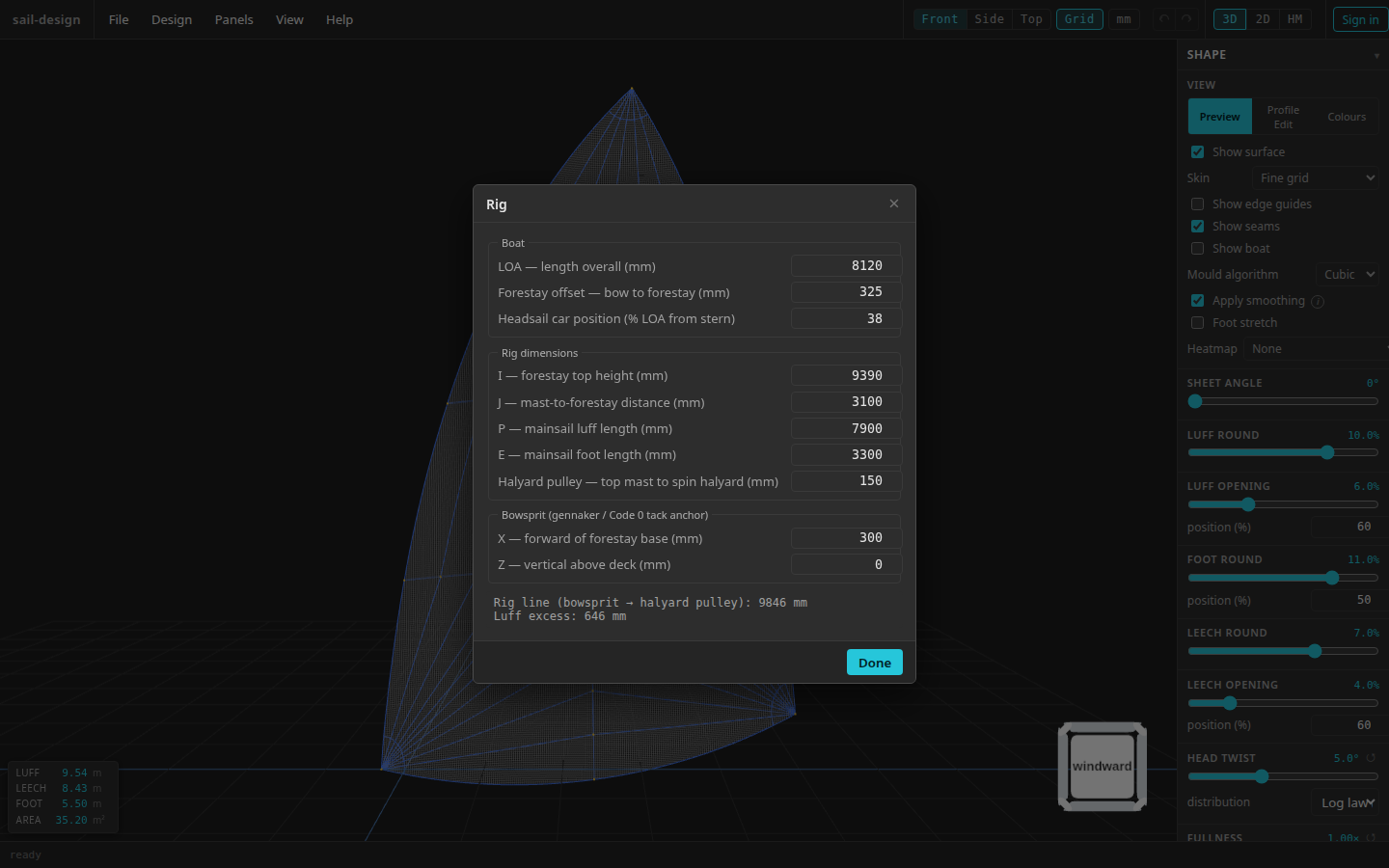
Current Rig dialog on the preloaded Albin Vega 27 gennaker example. Your File > New choices supply different starting values.
- Boat dimensions
- Genoa and spinnaker sheet positions
- Rig dimensions
- Tack anchor
- Rig-fit feedback
Set the sail dimensions
Open Design > Sail Shape and use the Edges section. These values define the sail itself; the Rig dialog defines where it is attached.
| Control | Range | What changes |
|---|---|---|
| Luff chord (mm) | 0 mm or more | Straight tack-to-head distance |
| Tack pendant max (mm) | 0 mm or more | Maximum distance the tack may rise along the rig line |
| Sheet line (% up luff) | 0–100% | Point where the 2-D sheet guide meets the actual luff |
| Leech chord (mm) | 0 mm or more | Straight clew-to-head distance |
| Foot chord (mm) | 0 mm or more | Straight tack-to-clew distance |
| Head length (mm) | 5 mm or more | Length of the head edge |
| Head angle (deg) | −45° to 45° | Tilt of the head edge about the luff direction |
The readout beside Luff chord (mm) shows the same excess relationship in a compact form. It turns red below 100 mm. A negative value means the current luff is longer than the rig line.
All current new sail types start with Head angle (deg) at 0°. Gennaker, Code 0, and Symmetric spinnaker start with a 5 mm Head length; the other six current sail types start at 50 mm.
Sheet line (% up luff) appears for Gennaker, Code 0, Genoa 135%, Working jib, High-aspect jib, Symmetric spinnaker, and Storm jib. Mainsail and Storm trisail do not display a sheet guide.
Use the guides to check the clew position in the 2-D Front view. With two genoa-car guides, keep the clew between them. With a single guide, place the clew on the guide or below it if a twing is to be used. Never place the clew above the uppermost guide.
How the sheet-line percentage is measured
0% is the actual sail tack and 100% is the head. The position follows physical distance along the three-dimensional luff, rather than a percentage of the forestay or the straight luff chord. A bowsprit or applied tack pendant moves the sail tack before this distance is measured; the pendant segment itself is not part of the luff.
Set a tack pendant cap
The applied pendant is half of the available luff excess, limited by Tack pendant max (mm). The adjacent pendant readout shows the distance currently applied. Enter 0 to pin the tack at its anchor.
New genoa, Working jib, High-aspect jib, and Storm jib designs start with a pendant cap derived from the chosen rig. The other current sail types start pinned. You can edit the cap for any design.
Continue shaping the sail
The remaining Sail Shape sections control different layers of the result: